


Key Takeways:
What Are Recurring Deposits?
Recurring Deposits is a feature that lets you automatically invest a fixed amount into the Wahed Real Estate Fund on a regular schedule. Once you set it up, each deposit processes on your chosen schedule without you needing to log back in or confirm each time.
You decide the amount and the frequency once. Wahed handles the rest.
Recurring Deposits are available for the Real Estate Fund only. Private Real Estate individual property deals are not eligible, as those opportunities are time limited and require a separate decision for each investment.
Why Use Recurring Deposits?
Building a real estate position takes time. Recurring Deposits makes that process automatic.
- Builds momentum. Small, consistent contributions accumulate into a meaningful position over time. The compound effect of regular investing is difficult to replicate with one-off deposits alone.
- No manual effort after setup. Once your schedule is live, each deposit processes automatically. You do not need to return to the app or make a decision each time.
- Removes timing pressure. Rather than trying to decide the right moment to invest, regular deposits spread your investment across time. You add to your fund ownership at each interval regardless of short-term conditions.
- Stays flexible. You can change the amount, pause the schedule, or cancel entirely at any time. There is no lock-in and no penalty for adjusting.
- Builds discipline. A regular deposit schedule keeps your investment habit consistent without relying on remembering to invest each week or month.
Deposit Frequency Options
When setting up a Recurring Deposit, you choose how often you want to invest:
Each recurring deposit is treated as a separate transaction and is subject to the same platform transaction limits as any other investment. If a recurrent transaction breaches an investor's limits (weekly, annual or per transaction), the recurrent will auto-pause.
How to Set Up a Recurring Deposit
Setting up a Recurring Deposit takes about one minute and is done entirely within the Wahed app.
Step 1: Open the Wahed app and navigate to the Real Estate Fund dashboard.

Step 2: Enter your deposit amount. The minimum is $100.

Step 3: Select your frequency: Weekly, Alternate Weekly, or Monthly.
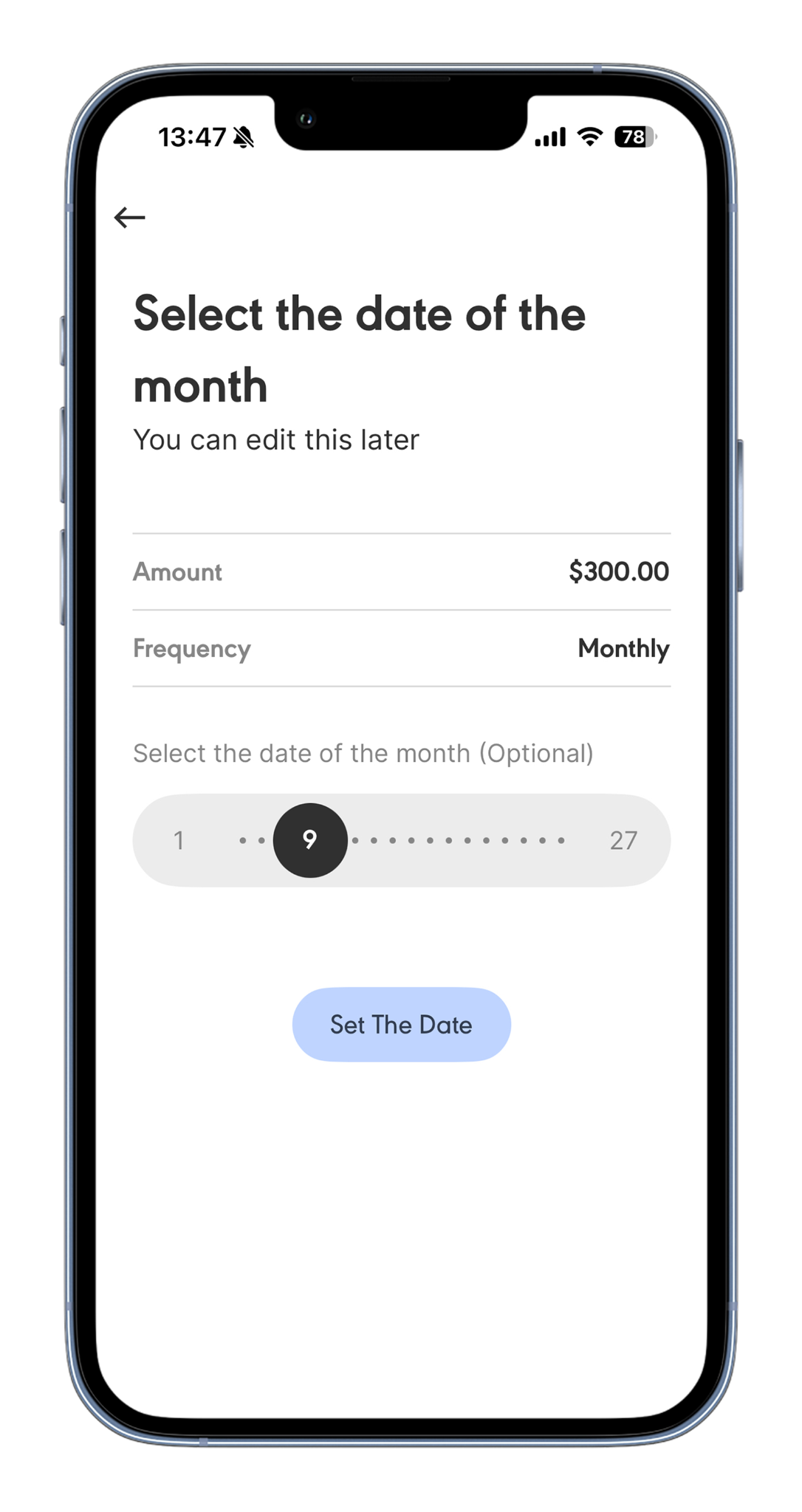
For monthly deposits: you will be asked to choose the date of the month (1st to 27th) that you want your deposit to process. This step is optional. If you skip it, the deposit defaults to the date you complete setup.
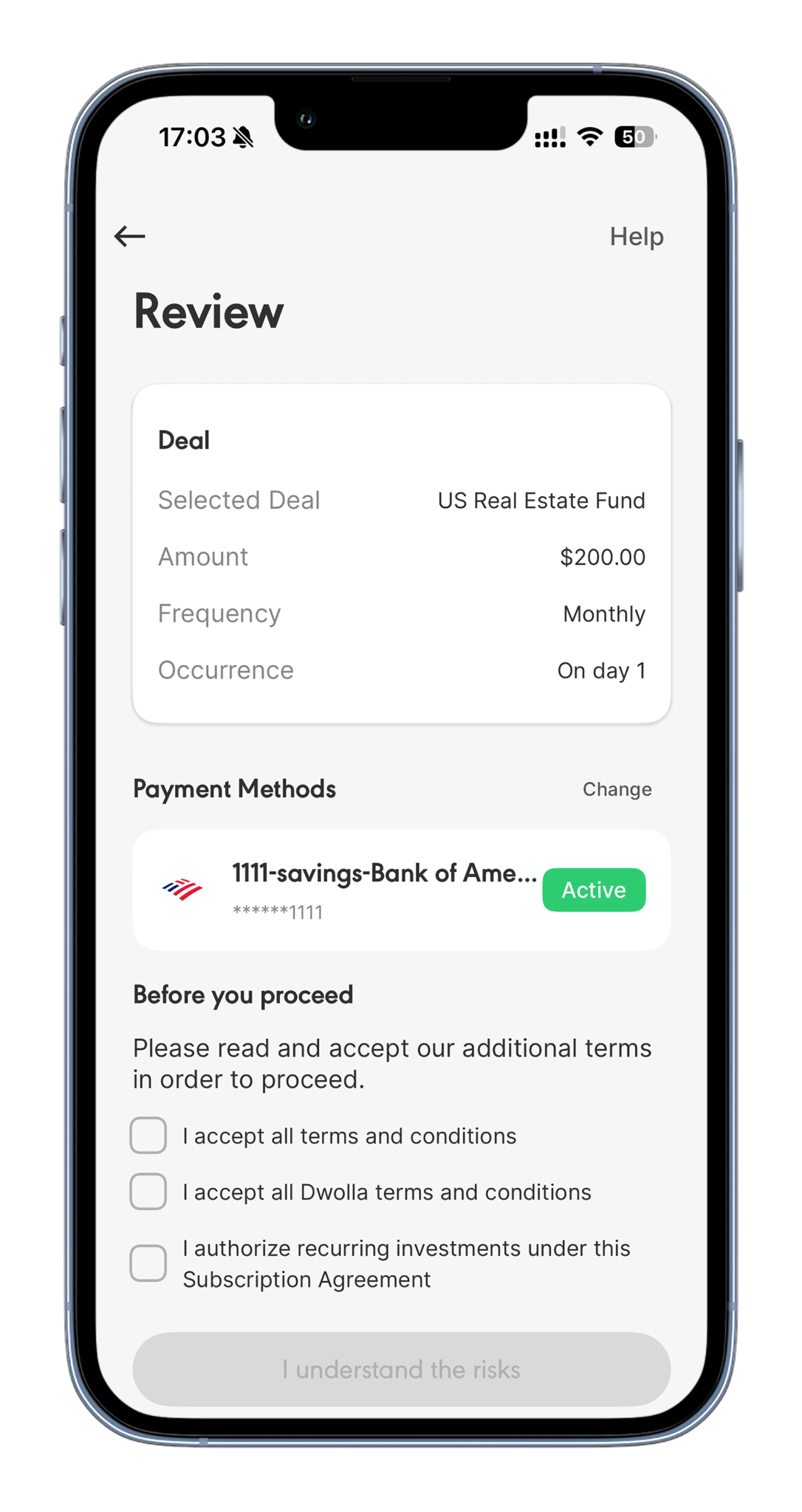
Step 4: Review your deposit details and confirm.
Your Recurring Deposit is now active. The first deposit processes according to your chosen schedule.
Ready to automate your investments?
No, you can have one active Recurring Deposit schedule at a time for the Real Estate Fund. If you want to change the amount or frequency, update your existing schedule rather than creating a new one.
Yes. Each recurring deposit is treated as a separate transaction and counts toward the $20,000 weekly platform transaction cap. For non-accredited investors, each deposit also counts toward your annual Regulation A investment limit.
The deposit will fail and you will receive a notification. It will not automatically retry. You can make a manual one-time deposit to cover the missed amount or wait for your next scheduled deposit.
Each recurring deposit creates a new batch of shares with its own six-month lock-up from the end of the calendar month it processes. Only batches that have completed their lock-up are eligible for redemption in a given window. This means investors with multiple recurring deposits will have different portions of their shares becoming eligible at different times. See the Wahed Real Estate Liquidity and Redemption Guide for full details on how eligibility is calculated.
Yes. You will receive a confirmation notification each time a deposit is successfully processed. If a deposit fails, you will also receive a notification explaining why and prompting you to take action.
If the amount now exceeds your available investor limit. This is automatic, no ops action needed on our end.
Yes, it auto unpauses once their available limit covers the amount again (for example, after their 12 month or weekly window resets, or after they raise their limit).
How to Manage, Pause or Cancel
You are in full control of your Recurring Deposit at all times. You can make changes at any point.
Change the Amount or Frequency
To update your deposit amount or frequency, go to your Recurring Deposits settings within the Real Estate Fund section of the app. Make your changes and confirm. The updated schedule applies from the next deposit date.
Pause a Recurring Deposit
If you want to pause temporarily without cancelling entirely, you can pause your Recurring Deposit from the same settings screen. While paused, no deposits will be processed. You can resume at any time.
Cancel a Recurring Deposit
To cancel, go to your Recurring Deposits settings and select Cancel. Cancellation takes effect immediately. Any deposit already processed before cancellation is not reversed. Your existing shares and any income distributions are unaffected.
Failed Deposits
If a scheduled deposit cannot be processed due to insufficient funds, you will receive a notification. The deposit will not be automatically retried. You can make a one-time manual deposit in the app to cover the missed amount, or simply wait for the next scheduled deposit.
No, you can have one active Recurring Deposit schedule at a time for the Real Estate Fund. If you want to change the amount or frequency, update your existing schedule rather than creating a new one.
Yes. Each recurring deposit is treated as a separate transaction and counts toward the $20,000 weekly platform transaction cap. For non-accredited investors, each deposit also counts toward your annual Regulation A investment limit.
The deposit will fail and you will receive a notification. It will not automatically retry. You can make a manual one-time deposit to cover the missed amount or wait for your next scheduled deposit.
Each recurring deposit creates a new batch of shares with its own six-month lock-up from the end of the calendar month it processes. Only batches that have completed their lock-up are eligible for redemption in a given window. This means investors with multiple recurring deposits will have different portions of their shares becoming eligible at different times. See the Wahed Real Estate Liquidity and Redemption Guide for full details on how eligibility is calculated.
Yes. You will receive a confirmation notification each time a deposit is successfully processed. If a deposit fails, you will also receive a notification explaining why and prompting you to take action.
If the amount now exceeds your available investor limit. This is automatic, no ops action needed on our end.
Yes, it auto unpauses once their available limit covers the amount again (for example, after their 12 month or weekly window resets, or after they raise their limit).
What Happens to Each Deposit
Each recurring deposit is treated as a separate investment transaction in the Real Estate Fund. This means:
- Each deposit goes through the same payment processing and checks as a standard one-time investment.
- Each deposit adds to your total share ownership in the fund.
- Each batch of shares acquired through a recurring deposit has its own six-month lock-up period, starting from the end of the calendar month in which that deposit is processed.
- Each deposit increases your proportional share of future quarterly income distributions.
- You will receive a confirmation notification for each deposit when it is processed successfully.

No, you can have one active Recurring Deposit schedule at a time for the Real Estate Fund. If you want to change the amount or frequency, update your existing schedule rather than creating a new one.
Yes. Each recurring deposit is treated as a separate transaction and counts toward the $20,000 weekly platform transaction cap. For non-accredited investors, each deposit also counts toward your annual Regulation A investment limit.
The deposit will fail and you will receive a notification. It will not automatically retry. You can make a manual one-time deposit to cover the missed amount or wait for your next scheduled deposit.
Each recurring deposit creates a new batch of shares with its own six-month lock-up from the end of the calendar month it processes. Only batches that have completed their lock-up are eligible for redemption in a given window. This means investors with multiple recurring deposits will have different portions of their shares becoming eligible at different times. See the Wahed Real Estate Liquidity and Redemption Guide for full details on how eligibility is calculated.
Yes. You will receive a confirmation notification each time a deposit is successfully processed. If a deposit fails, you will also receive a notification explaining why and prompting you to take action.
If the amount now exceeds your available investor limit. This is automatic, no ops action needed on our end.
Yes, it auto unpauses once their available limit covers the amount again (for example, after their 12 month or weekly window resets, or after they raise their limit).
Frequently Asked Questions
No, you can have one active Recurring Deposit schedule at a time for the Real Estate Fund. If you want to change the amount or frequency, update your existing schedule rather than creating a new one.
Yes. Each recurring deposit is treated as a separate transaction and counts toward the $20,000 weekly platform transaction cap. For non-accredited investors, each deposit also counts toward your annual Regulation A investment limit.
The deposit will fail and you will receive a notification. It will not automatically retry. You can make a manual one-time deposit to cover the missed amount or wait for your next scheduled deposit.
Each recurring deposit creates a new batch of shares with its own six-month lock-up from the end of the calendar month it processes. Only batches that have completed their lock-up are eligible for redemption in a given window. This means investors with multiple recurring deposits will have different portions of their shares becoming eligible at different times. See the Wahed Real Estate Liquidity and Redemption Guide for full details on how eligibility is calculated.
Yes. You will receive a confirmation notification each time a deposit is successfully processed. If a deposit fails, you will also receive a notification explaining why and prompting you to take action.
If the amount now exceeds your available investor limit. This is automatic, no ops action needed on our end.
Yes, it auto unpauses once their available limit covers the amount again (for example, after their 12 month or weekly window resets, or after they raise their limit).
No, the same investor limit checks on the deposit screen apply when setting up a recurrent, so it can't be created above what they're currently eligible for.
No, you can have one active Recurring Deposit schedule at a time for the Real Estate Fund. If you want to change the amount or frequency, update your existing schedule rather than creating a new one.
Yes. Each recurring deposit is treated as a separate transaction and counts toward the $20,000 weekly platform transaction cap. For non-accredited investors, each deposit also counts toward your annual Regulation A investment limit.
The deposit will fail and you will receive a notification. It will not automatically retry. You can make a manual one-time deposit to cover the missed amount or wait for your next scheduled deposit.
Each recurring deposit creates a new batch of shares with its own six-month lock-up from the end of the calendar month it processes. Only batches that have completed their lock-up are eligible for redemption in a given window. This means investors with multiple recurring deposits will have different portions of their shares becoming eligible at different times. See the Wahed Real Estate Liquidity and Redemption Guide for full details on how eligibility is calculated.
If the amount now exceeds your available investor limit. This is automatic, no ops action needed on our end.
If the amount now exceeds your available investor limit. This is automatic, no ops action needed on our end.
Yes, it auto unpauses once their available limit covers the amount again (for example, after their 12 month or weekly window resets, or after they raise their limit).
No, you can have one active Recurring Deposit schedule at a time for the Real Estate Fund. If you want to change the amount or frequency, update your existing schedule rather than creating a new one.
Yes. Each recurring deposit is treated as a separate transaction and counts toward the $20,000 weekly platform transaction cap. For non-accredited investors, each deposit also counts toward your annual Regulation A investment limit.
The deposit will fail and you will receive a notification. It will not automatically retry. You can make a manual one-time deposit to cover the missed amount or wait for your next scheduled deposit.
Each recurring deposit creates a new batch of shares with its own six-month lock-up from the end of the calendar month it processes. Only batches that have completed their lock-up are eligible for redemption in a given window. This means investors with multiple recurring deposits will have different portions of their shares becoming eligible at different times. See the Wahed Real Estate Liquidity and Redemption Guide for full details on how eligibility is calculated.
Yes. You will receive a confirmation notification each time a deposit is successfully processed. If a deposit fails, you will also receive a notification explaining why and prompting you to take action.
If the amount now exceeds your available investor limit. This is automatic, no ops action needed on our end.
Yes, it auto unpauses once their available limit covers the amount again (for example, after their 12 month or weekly window resets, or after they raise their limit).
No, the same investor limit checks on the deposit screen apply when setting up a recurrent, so it can't be created above what they're currently eligible for.


