


Key Takeways:
What Are Investment Limits?
Investment limits are caps on how much you can invest in the Wahed Real Estate Fund within a given period. They exist because U.S. securities regulations require that investor participation stays proportionate to each investor's financial situation.
Your limits depend on two things: your investor type (accredited or non-accredited) and, for accredited investors, whether you have completed verification with Wahed.
These limits are now visible inside the app. You can check them at any time, see exactly how much capacity you have remaining and edit your limits if your situation changes.
Your Limits at a Glance
Default limits for accredited investors
When you first complete onboarding as an accredited investor, you start with a default limit of $20,000 per transaction and $20,000 per week. To unlock the higher limits, you need to complete identity verification with Wahed. Reach out to realestate.us@wahed.com to get verified.
Annual limit for non-accredited investors
Your annual cap is calculated automatically by the app based on the net worth and income figures you enter during onboarding. The higher that figure, the more you can invest per year. You can update these figures at any time, and your annual cap will recalculate immediately.
Shared limits
Your weekly and annual limits apply across all Wahed Real Estate investments, including any Private Real Estate deals if you hold them. They are not separate pools per product. Any deposit you make in either product counts toward the same weekly and annual totals.
How to View Your Limits in the App
You can check your limits at any time from the Real Estate Fund dashboard.
1. Open the Wahed app and go to the Real Estate Fund.
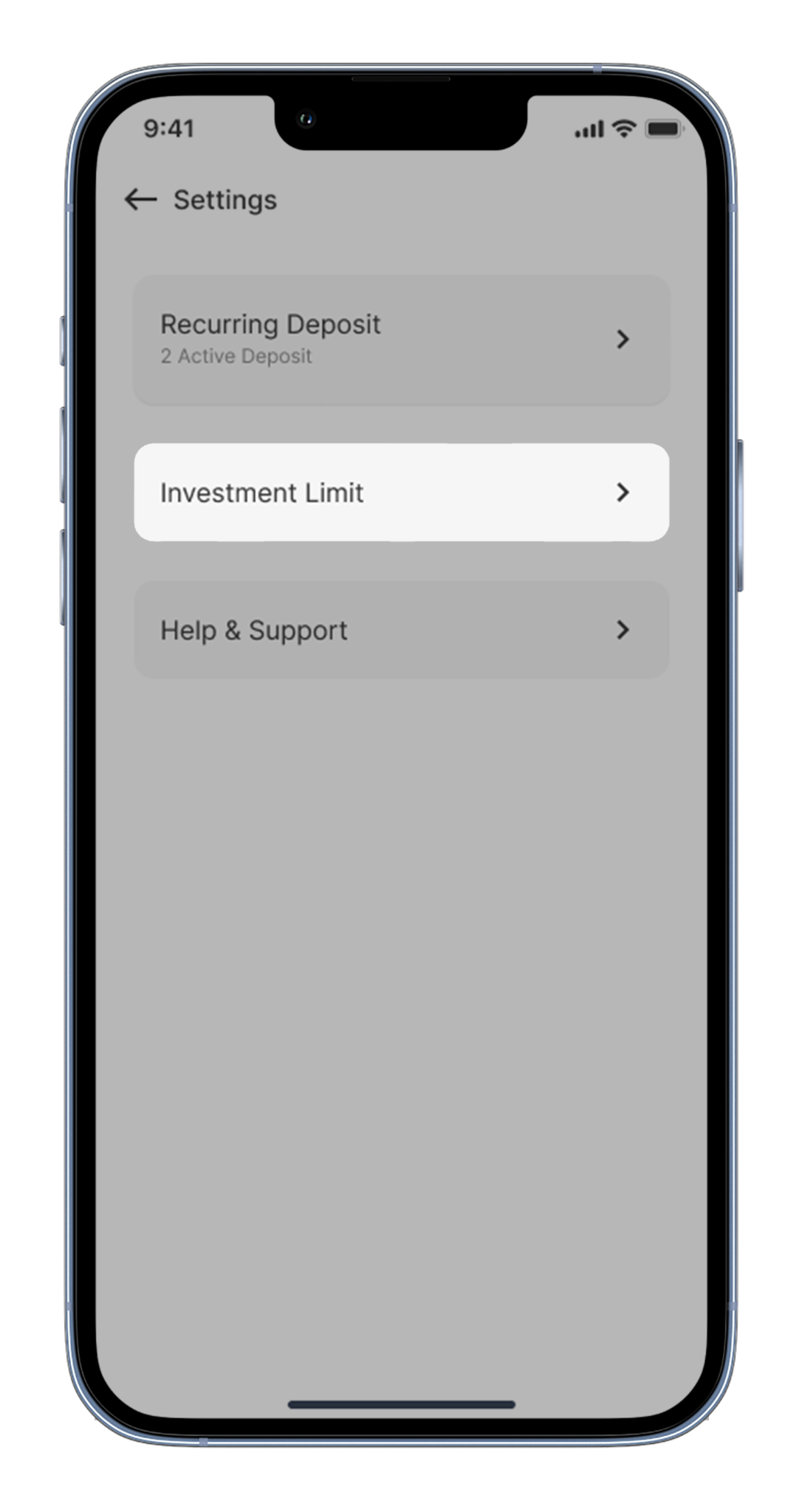
2. Tap the settings icon (gear icon) in the top right corner of the fund dashboard.

3. Select Investment Limits. This opens a screen showing your investor type, verification status, and a full breakdown of your limits with current usage and remaining capacity.
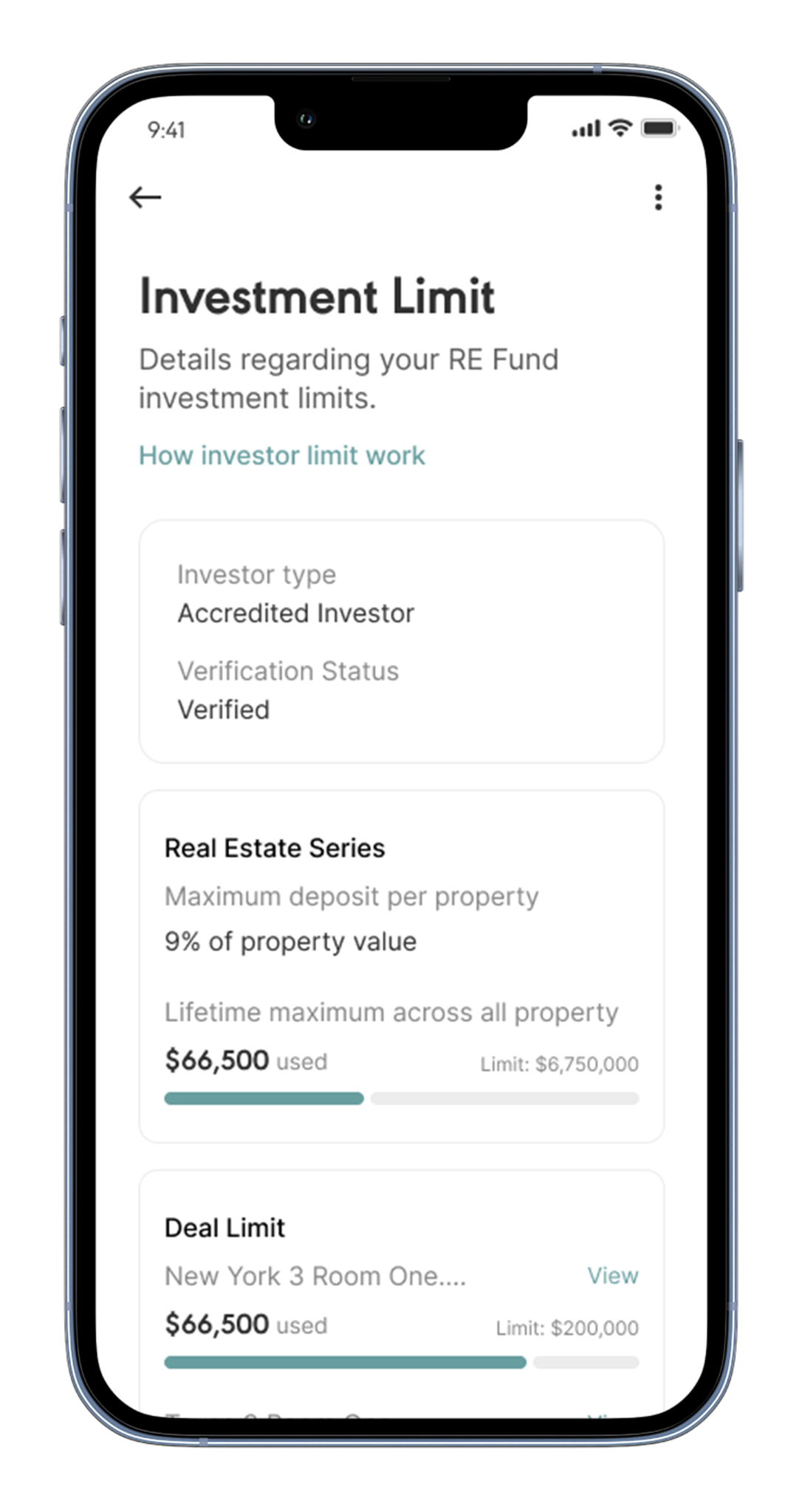
4. Tap "How investor limits work?" at the top of the screen for a simple explanation of each limit.
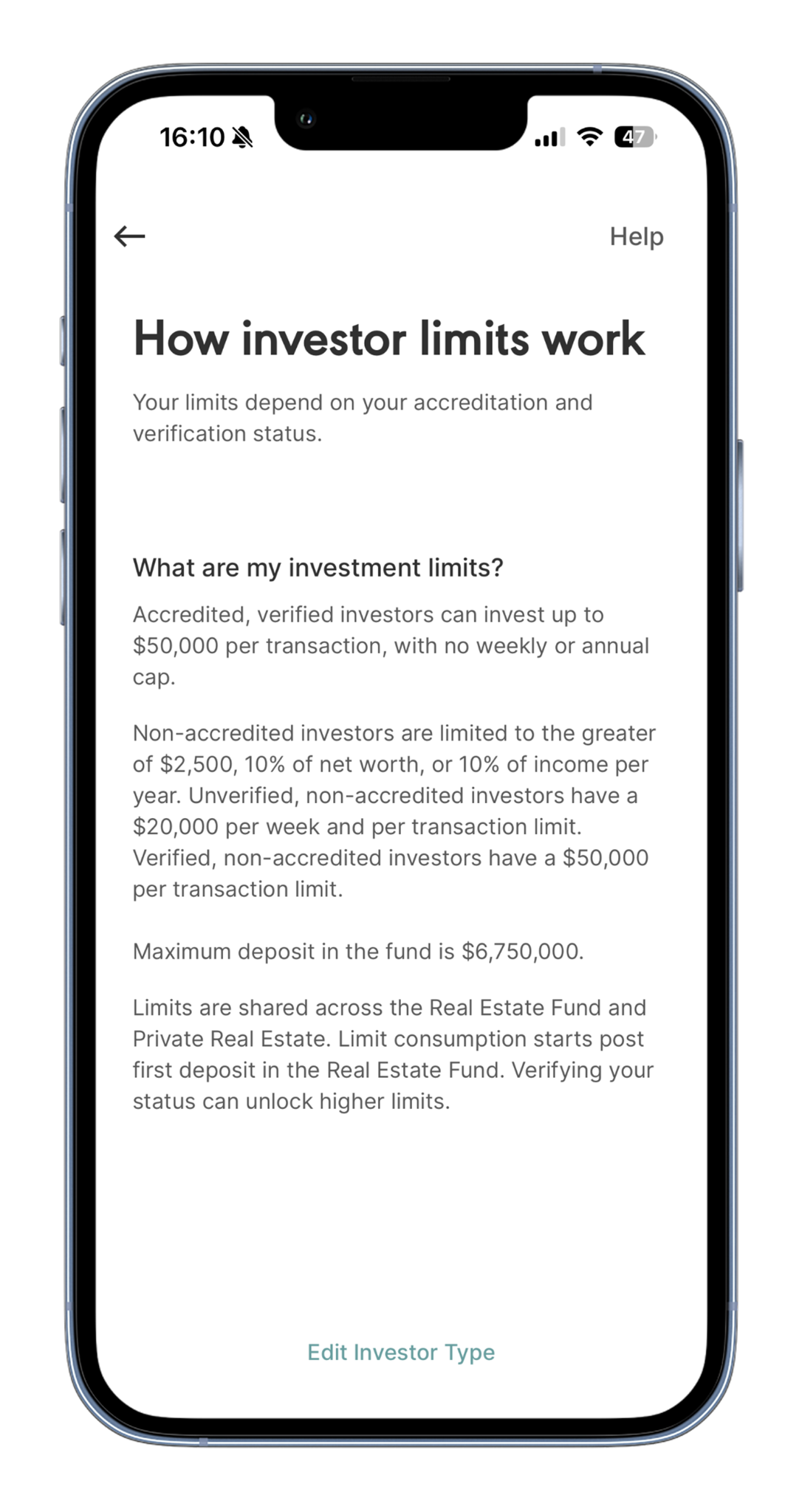
The Investment Limit screen updates in real time. Any deposit you make is reflected immediately.
Go to the Real Estate Fund, tap the settings icon (gear icon) in the top right corner, then select Investment Limits. You will see a full breakdown of every limit with your current usage and remaining capacity.
App version 3.148.2 or above. If you do not see Investment Limits in settings, update the Wahed app from the App Store or Google Play Store.
Contact our team at realestate.us@wahed.com to complete verification. Once verified, your per-transaction limit increases to $50,000 and your weekly cap is removed.
Your annual limit is calculated automatically based on the net worth and income figures you enter during onboarding. You can update these figures at any time in the app and your limit will recalculate immediately.
The app shows an error before you confirm. You cannot proceed with a deposit that exceeds any of your limits. You would need to edit your investor limits before proceeding.
The per-transaction and lifetime limits apply to the Real Estate Fund. The weekly and annual limits are shared across all Wahed Real Estate investments, so any Private Real Estate deals you hold count toward the same totals.
Limits reset on a rolling basis from the date of your first deposit, not on a fixed calendar date. The exact reset date for each limit is shown on the Investment Limit screen.
How Limits Appear During a Deposit
When you go to make a deposit, your relevant limits are shown on the deposit screen. You can see how much of your available capacity you are about to use before you confirm.
If the amount you enter would exceed any of your limits, the app shows an error before you proceed. You cannot confirm a deposit that breaches a limit. Reduce the amount or check the Investment Limit screen to see which limit is being reached.
Tap "Check my investor limit" on the deposit screen to go directly to the Investment Limit screen.
Go to the Real Estate Fund, tap the settings icon (gear icon) in the top right corner, then select Investment Limits. You will see a full breakdown of every limit with your current usage and remaining capacity.
App version 3.148.2 or above. If you do not see Investment Limits in settings, update the Wahed app from the App Store or Google Play Store.
Contact our team at realestate.us@wahed.com to complete verification. Once verified, your per-transaction limit increases to $50,000 and your weekly cap is removed.
Your annual limit is calculated automatically based on the net worth and income figures you enter during onboarding. You can update these figures at any time in the app and your limit will recalculate immediately.
The app shows an error before you confirm. You cannot proceed with a deposit that exceeds any of your limits. You would need to edit your investor limits before proceeding.
The per-transaction and lifetime limits apply to the Real Estate Fund. The weekly and annual limits are shared across all Wahed Real Estate investments, so any Private Real Estate deals you hold count toward the same totals.
Limits reset on a rolling basis from the date of your first deposit, not on a fixed calendar date. The exact reset date for each limit is shown on the Investment Limit screen.
How to Update Your Investor Details
If your financial situation has changed, you can update your net worth, income, or investor type in the app. Your limits recalculate automatically when you save.
5. Go to the Real Estate Fund and tap the settings icon (top right).
6. Select Investment Limits.
7. Tap "How investor limits work?". At the bottom of that screen, tap Edit Investor Limits.
8. Select your investor type (Accredited or Non-Accredited). Tap each option to read a full description before selecting.
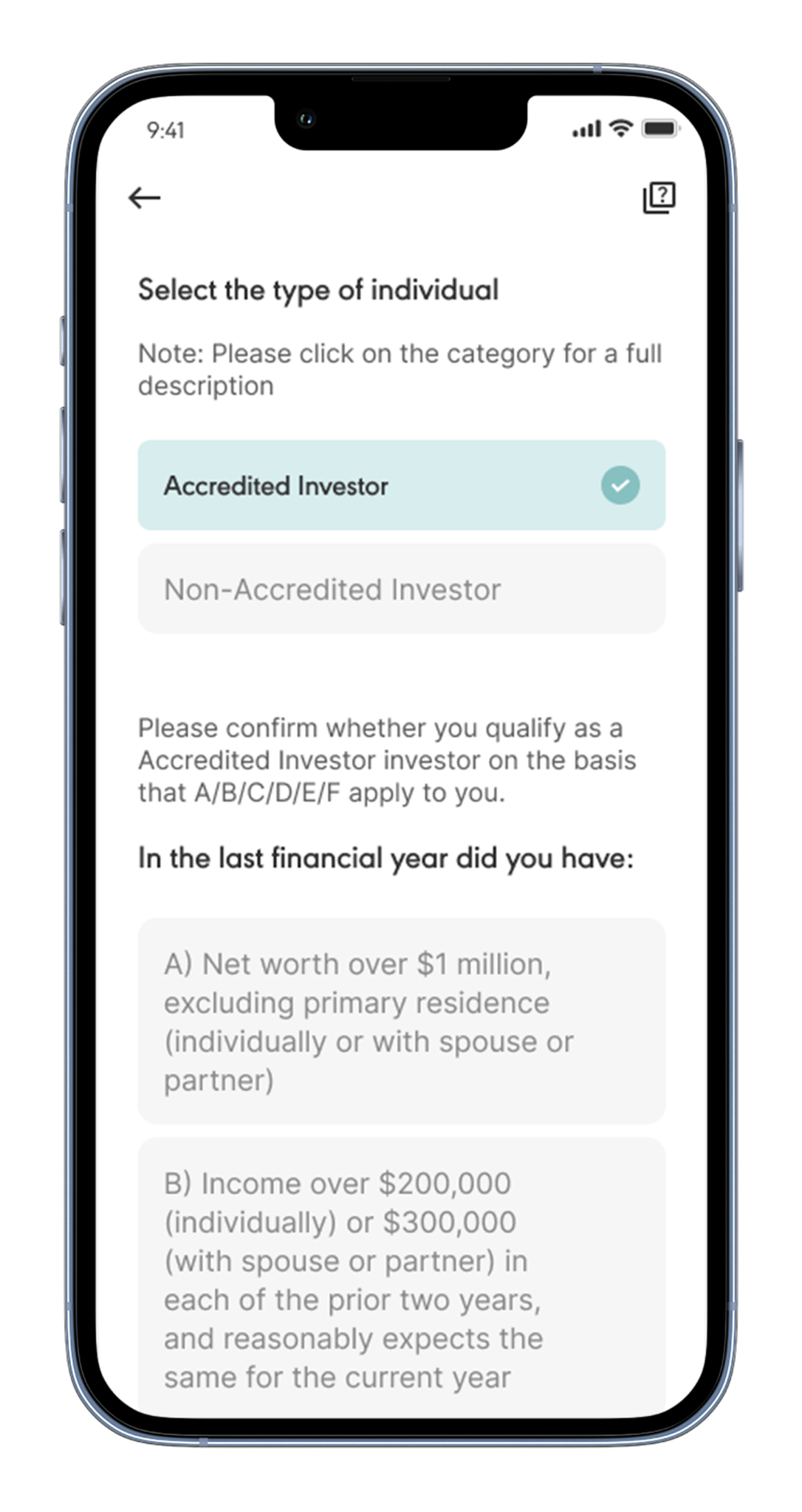
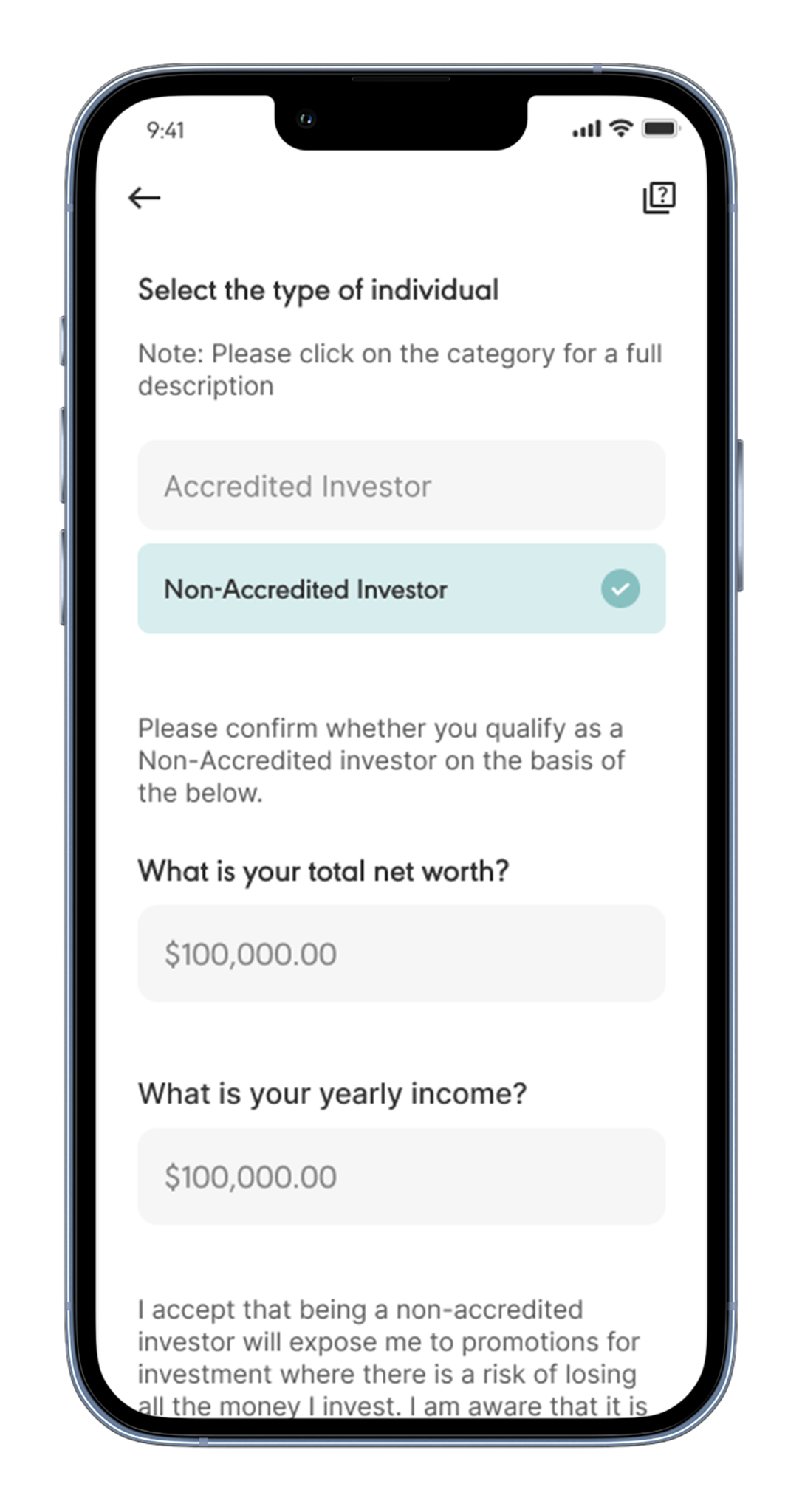
9. If selecting Non-Accredited: enter your total net worth and yearly income. Review the risk disclosure, accept the Wahed Financial LLC Investor Terms and Conditions, and tap Continue.
10. Tap Yes to confirm. A 1-day cool-off period begins immediately. You will not be able to edit your investor details again until it ends.

11. Your details are updated. A success screen confirms the change and your limits now reflect the new information.


Go to the Real Estate Fund, tap the settings icon (gear icon) in the top right corner, then select Investment Limits. You will see a full breakdown of every limit with your current usage and remaining capacity.
App version 3.148.2 or above. If you do not see Investment Limits in settings, update the Wahed app from the App Store or Google Play Store.
Contact our team at realestate.us@wahed.com to complete verification. Once verified, your per-transaction limit increases to $50,000 and your weekly cap is removed.
Your annual limit is calculated automatically based on the net worth and income figures you enter during onboarding. You can update these figures at any time in the app and your limit will recalculate immediately.
The app shows an error before you confirm. You cannot proceed with a deposit that exceeds any of your limits. You would need to edit your investor limits before proceeding.
The per-transaction and lifetime limits apply to the Real Estate Fund. The weekly and annual limits are shared across all Wahed Real Estate investments, so any Private Real Estate deals you hold count toward the same totals.
Limits reset on a rolling basis from the date of your first deposit, not on a fixed calendar date. The exact reset date for each limit is shown on the Investment Limit screen.
Frequently Asked Questions
Go to the Real Estate Fund, tap the settings icon (gear icon) in the top right corner, then select Investment Limits. You will see a full breakdown of every limit with your current usage and remaining capacity.
App version 3.148.2 or above. If you do not see Investment Limits in settings, update the Wahed app from the App Store or Google Play Store.
Contact our team at realestate.us@wahed.com to complete verification. Once verified, your per-transaction limit increases to $50,000 and your weekly cap is removed.
Your annual limit is calculated automatically based on the net worth and income figures you enter during onboarding. You can update these figures at any time in the app and your limit will recalculate immediately.
The app shows an error before you confirm. You cannot proceed with a deposit that exceeds any of your limits. You would need to edit your investor limits before proceeding.
The per-transaction and lifetime limits apply to the Real Estate Fund. The weekly and annual limits are shared across all Wahed Real Estate investments, so any Private Real Estate deals you hold count toward the same totals.
Limits reset on a rolling basis from the date of your first deposit, not on a fixed calendar date. The exact reset date for each limit is shown on the Investment Limit screen.
Go to the Real Estate Fund, tap the settings icon (gear icon) in the top right corner, then select Investment Limits. You will see a full breakdown of every limit with your current usage and remaining capacity.
App version 3.148.2 or above. If you do not see Investment Limits in settings, update the Wahed app from the App Store or Google Play Store.
Contact our team at realestate.us@wahed.com to complete verification. Once verified, your per-transaction limit increases to $50,000 and your weekly cap is removed.
Your annual limit is calculated automatically based on the net worth and income figures you enter during onboarding. You can update these figures at any time in the app and your limit will recalculate immediately.
The per-transaction and lifetime limits apply to the Real Estate Fund. The weekly and annual limits are shared across all Wahed Real Estate investments, so any Private Real Estate deals you hold count toward the same totals.
The per-transaction and lifetime limits apply to the Real Estate Fund. The weekly and annual limits are shared across all Wahed Real Estate investments, so any Private Real Estate deals you hold count toward the same totals.
Limits reset on a rolling basis from the date of your first deposit, not on a fixed calendar date. The exact reset date for each limit is shown on the Investment Limit screen.
Go to the Real Estate Fund, tap the settings icon (gear icon) in the top right corner, then select Investment Limits. You will see a full breakdown of every limit with your current usage and remaining capacity.
App version 3.148.2 or above. If you do not see Investment Limits in settings, update the Wahed app from the App Store or Google Play Store.
Contact our team at realestate.us@wahed.com to complete verification. Once verified, your per-transaction limit increases to $50,000 and your weekly cap is removed.
Your annual limit is calculated automatically based on the net worth and income figures you enter during onboarding. You can update these figures at any time in the app and your limit will recalculate immediately.
The app shows an error before you confirm. You cannot proceed with a deposit that exceeds any of your limits. You would need to edit your investor limits before proceeding.
The per-transaction and lifetime limits apply to the Real Estate Fund. The weekly and annual limits are shared across all Wahed Real Estate investments, so any Private Real Estate deals you hold count toward the same totals.
Limits reset on a rolling basis from the date of your first deposit, not on a fixed calendar date. The exact reset date for each limit is shown on the Investment Limit screen.


